Enable AI Features
AI features that use LLM functionality are off by default. This article shows how to enable them, who can do it, and what changes when you do.
Before enabling, we recommend reviewing AI Data Privacy & Security article and the Syskit AI Terms.
Prerequisites
To enable AI features:
- You need the Syskit Point Admin role.
- Your organization uses Syskit Point Cloud. During the Early Access Program, AI features are available to all Cloud customers.
Enable Point AI
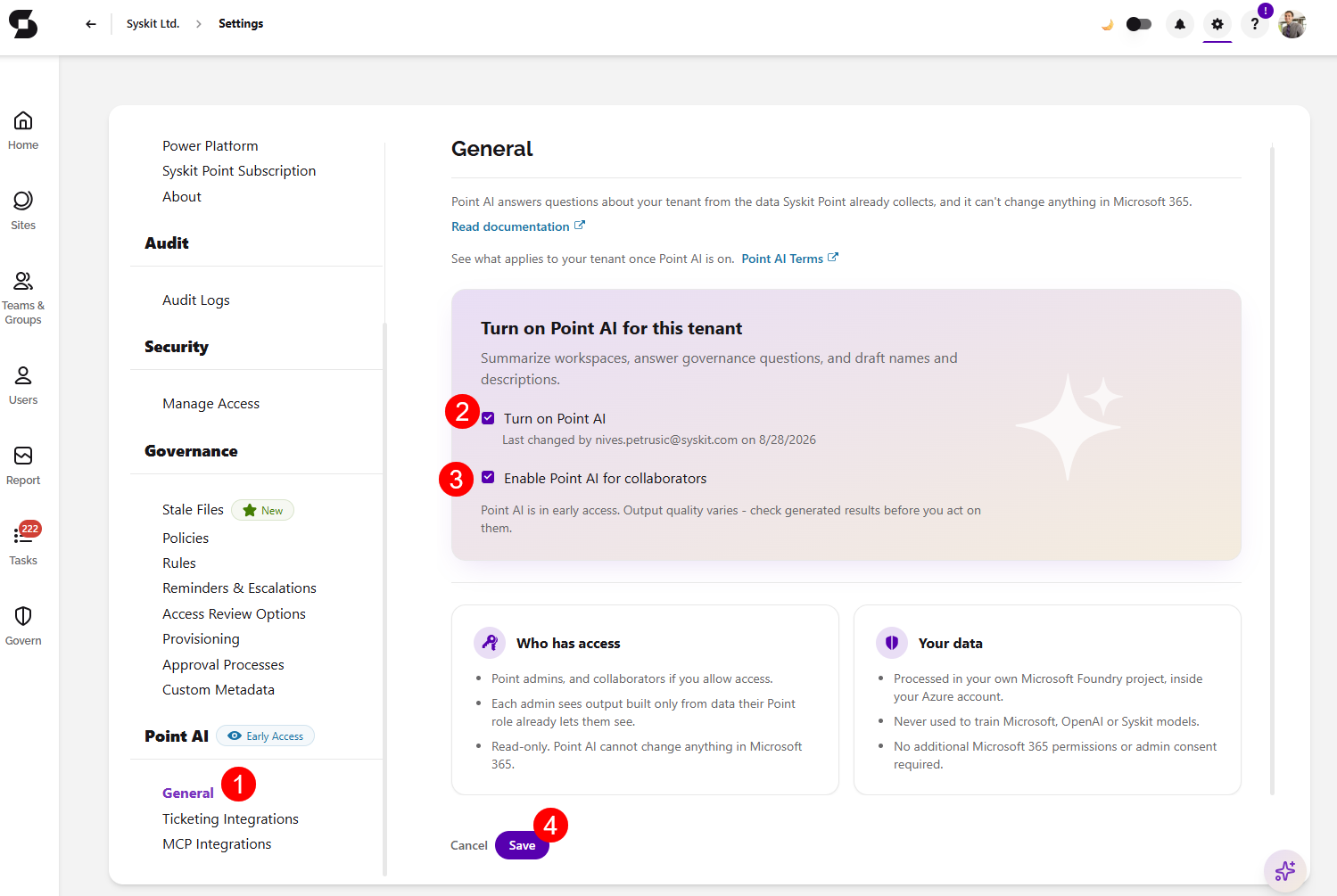
- In Syskit Point, go to Settings > Point AI > General (1).
- Select the Turn on Point AI checkbox (2) to enable Point AI.
- This is a single opt-in.
- Opting in makes all Point AI features available; there are no per-feature toggles.
- Optionally, select the Enable Point AI for collaborators checkbox (3) below it to make Point AI available to collaborators.
- This checkbox does not control collaborator access to the Syskit Point MCP Server, which is set separately on the MCP Integrations page.
- Click Save (4) to finalize your decision.
Please note: changes take effect immediately. Users may need to refresh Syskit Point to see new AI entry points, such as the Syskit Point Assistant icon.
What to Expect when Enabling Point AI
Enabling Point AI:
- Makes LLM-based features available to your Syskit Point users, within their existing Point roles.
- Means you accept that usage falls under the Early Access fair-usage principles, see Early Access Program.
Enabling Point AI doesn't:
- Change what data Syskit Point collects from your tenant.
- Give any user access to data beyond their Point role.
- Allow AI to make changes in your environment.
- AI features only deliver findings and recommendations.
The Sensitivity Label Recommendations report uses machine learning with no LLM involved. It is part of Syskit Point's standard functionality and are not controlled by the Point AI setting.
Disable Point AI
To turn Point AI off, return to Settings > Point AI > General and clear the Turn on Point AI checkbox.
This takes effect immediately:
- AI entry points disappear from the interface.
- No LLM processing of your data occurs while disabled.
- Connected AI tools using the Syskit Point MCP Server lose access.
You can re-enable the feature at any time.