Syskit Point MCP Server
This feature uses LLM functionality which means admin opt-in required. Take a look at the AI Data Privacy & Security and Enable AI features articles for more details.
The Syskit Point MCP Server lets you query your Microsoft 365 governance data directly from any AI tool that supports the Model Context Protocol (MCP):
- Microsoft Copilot
- Claude, or
- Custom agents you build
Prerequisites
- AI features are enabled in Syskit Point.
- Setting up the MCP Server requires the Syskit Point Admin role.
- An MCP-compatible AI tool that supports remote HTTP MCP servers with OAuth.
Capabilities
The Syskit Point MCP Server offers the following capabilities:
- Directory - find users, groups, and workspaces.
- Access - read access and permissions for Microsoft 365.
- Sharing - read external sharing information for Microsoft 365.
- Reports - discover reports and open them in Syskit Point, such as external sharing, ownerless groups, excessive storage, "which resources can this user access."
- The MCP Server helps you discover the right report and provides a link to open it in Syskit Point.
- Running arbitrary reports and exporting report data are not supported.
- Audit - read Microsoft 365 audit activity: user and admin activity, file and sharing events, membership changes, within a date range.
- Governance - read governance details about Microsoft 365.
- Storage - read site storage use, growth, and quotas, including version-cleanup opportunities across the tenant.
- Power Platform - read Power Platform environments, apps, flows, connections, and their ownership risks.
- Licensing - read Microsoft 365 license use and assignments.
The MCP Server is read-and-report only: it delivers findings and report results, and does not expose administrative write actions in your tenant.
- Queries return only data the connecting identity is allowed to view under Point's permission model, within Point's sync scope and your audit retention period.
Set up the MCP Server
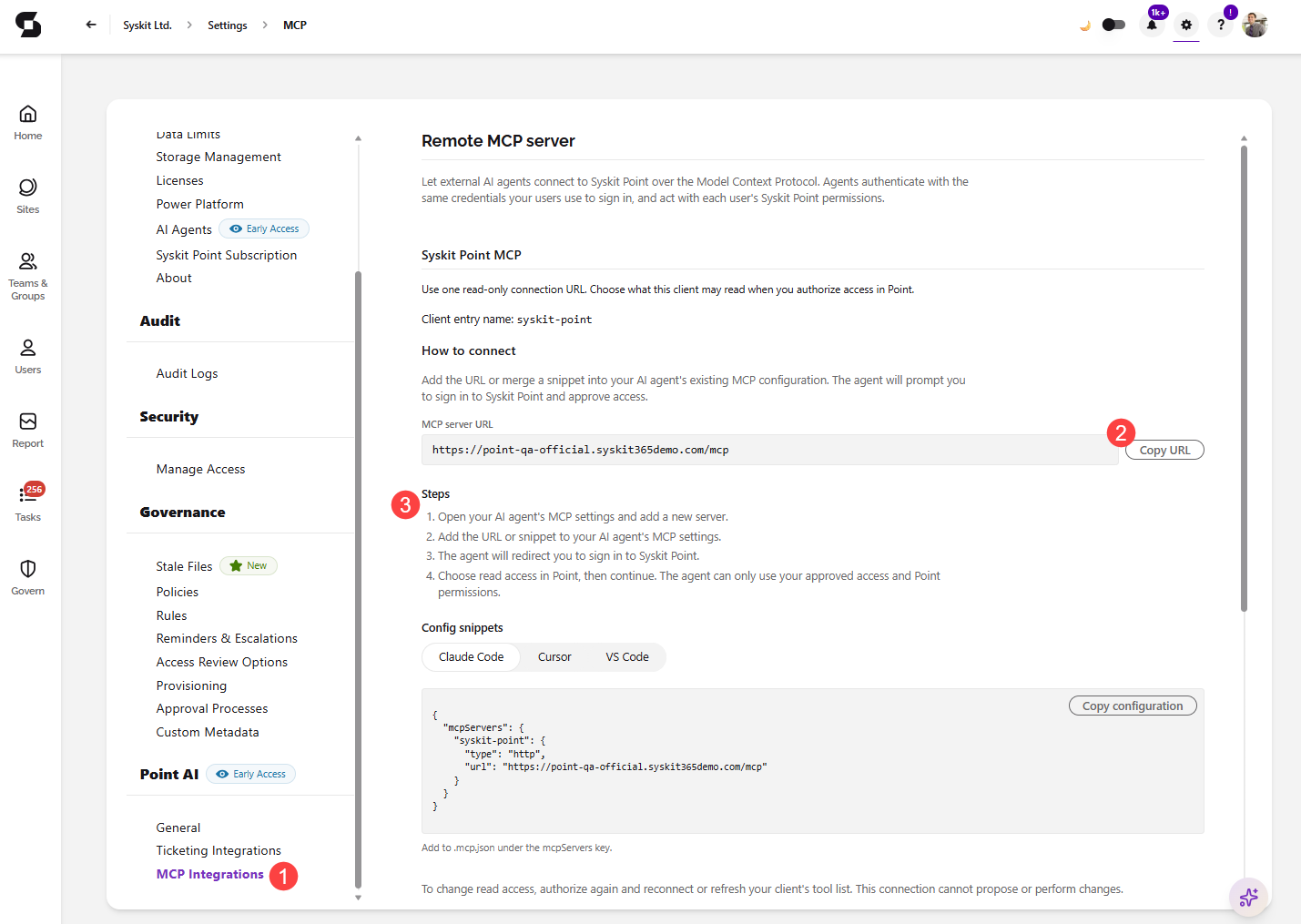
- In Syskit Point, go to Settings > Point AI > MCP Integrations (1).
- As instructed on screen, paste the provided server URL (2) into any MCP-compatible AI agent.
- The agent will walk you through signing in to Syskit Point.
- The agent can only use your approved access and Point permissions.
- Follow the Steps (3) listed on screen if you are unsure.
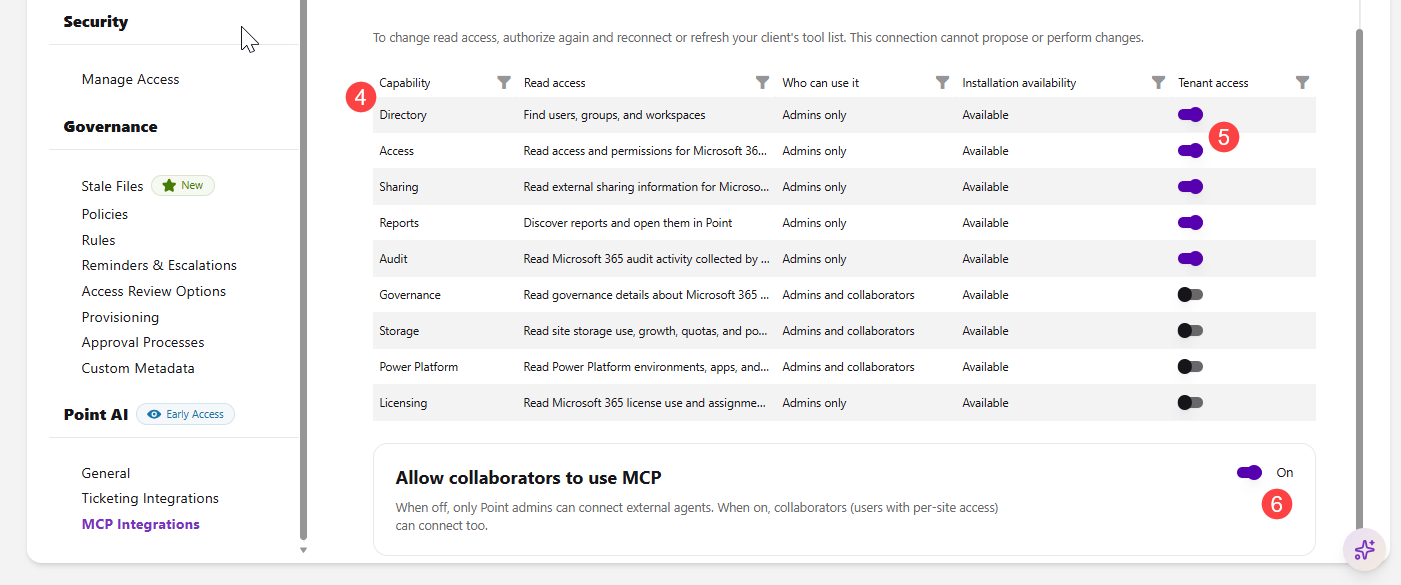
- Select the capabilities (4) you want to make available to connected AI tools and turn the toggle on (5) next to the capability you want to include.
- Directory, Access, Sharing, Reports, and Audit are turned on by default.
- Governance, Storage, Power Platform, and Licensing are turned off by default.
- Optionally, you can also turn on the Allow collaborators to use MCP toggle (6) to let Syskit Point Collaborators connect their AI tools as well.
- For more details, see the Collaborator Access section.
Connect Your AI Tool
To connect your AI tool, you only need the MCP server URL. No admin-issued credential is required.
-
Open your AI tool's MCP settings and add a new server.
-
Paste the MCP server URL as the server address.
-
The AI tool redirects you to sign in to Syskit Point.
-
Choose the capabilities the AI tool can use and approve consent.
- Once you approve consent, the AI tool can query Syskit Point using your permissions.
-
Claude - add a custom connector: Settings > Connectors > Add custom connector, paste the MCP server URL, and sign in to Syskit Point. You can test it after with a prompt: "Using Syskit Point, list ownerless groups."
-
Microsoft Copilot Studio - add a new tool of type Model Context Protocol pointing to the Syskit Point MCP server URL, configure authentication, and publish to the users or agents who need governance data.
-
Custom agents - any MCP-compatible framework that supports remote HTTP MCP servers with OAuth can connect using the MCP server URL; list the available tools on connection to discover the capability surface programmatically.
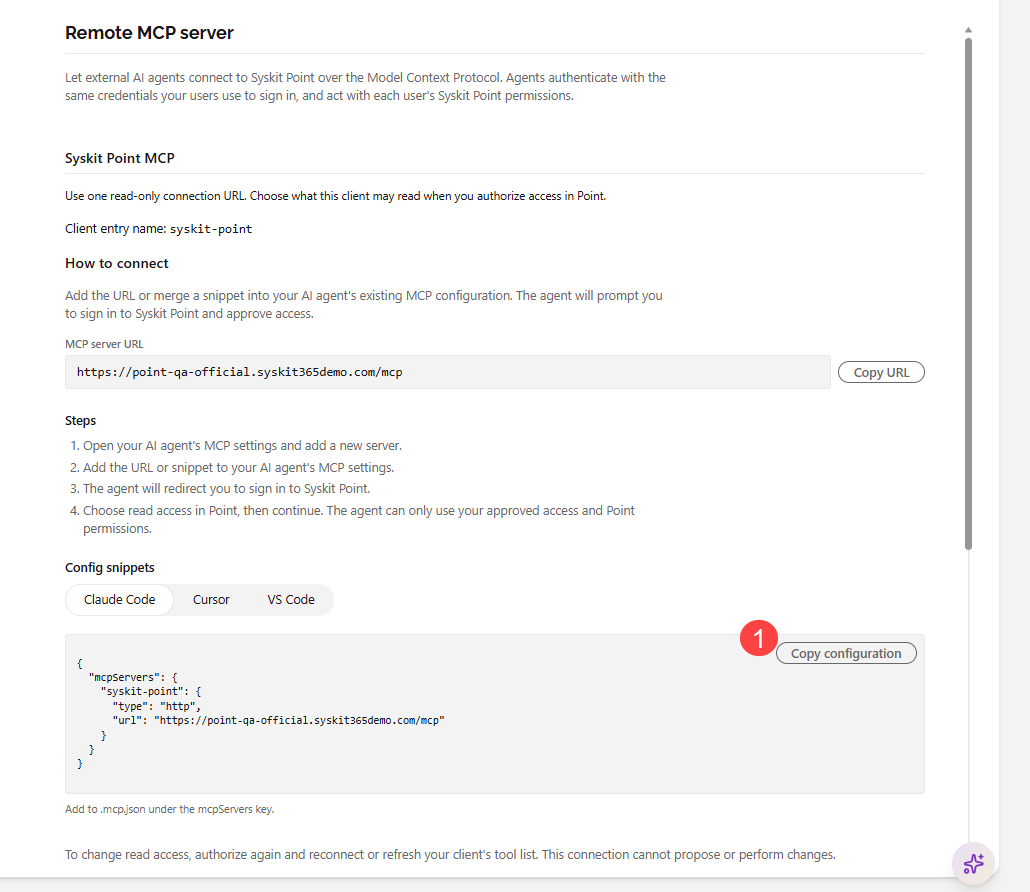
The configuration snippets (1) are located in Settings > Point AI > MCP Integrations for Claude Code, Cursor, and VS Code.
Consent
Access to the MCP Server is approved on two levels:
- Admins choose the available capabilities.
- On the MCP Integrations page, a Syskit Point Admin selects which capabilities AI tools can use.
- Users approve access for their AI tool.
- When signing in from the AI tool, each user chooses which of the capabilities enabled by the admin the AI tool can use.
Please note: To change which capabilities your AI tool can use, authorize again and reconnect, or refresh your AI tool's tool list.
- This also applies when an admin enables additional capabilities later.
Collaborator Access
When the Allow collaborators to use MCP toggle is off, only Syskit Point Admins can connect AI tools. When it is on, Syskit Point Collaborators can connect their AI tools too.
- Collaborator access to the MCP Server requires only the Turn on Point AI setting to be enabled.
- The Enable Point AI for collaborators checkbox does not control collaborator access to the MCP Server.
- Collaborators can use only the capabilities marked Admins and collaborators in the Who can use it column: Governance, Storage, and Power Platform.
- The capability also needs to be turned on under Tenant access. These three capabilities are turned off by default.
- All other capabilities are available to Syskit Point Admins only.
Collaborator access does not grant tenant-wide visibility. Collaborators work within the limits of their Syskit Point Collaborators role:
- Searches return only users the collaborator is allowed to see.
- Restricted operations remain blocked.
Manage Access
In Syskit Point, go to Settings > Point AI > MCP Integrations to:
- Change the available capabilities: turn capabilities on or off under Tenant access.
- Users need to authorize again and reconnect, or refresh their AI tool's tool list, to use newly enabled capabilities.
- Turn collaborator access on or off: use the Allow collaborators to use MCP toggle.
To turn off all MCP Server access, disable Point AI. Connected AI tools lose access immediately.
Early Access Status
The MCP Server is in Early Access and under active development. If a query fails or returns unexpected results, share it when the product team reaches out for feedback. MCP feedback is a top priority right now.