Naming Recommendations
This feature uses LLM functionality which means admin opt-in required. It is off by default; processing runs through Microsoft Foundry (Azure-hosted models) in your selected Azure region, and your data is never used to train the foundation models. Take a look at the AI Data Privacy & Security and Enable AI features articles for more details.
Naming provisioning templates and governance policies is a small but constant friction point. Every policy-creation workflow stalls for a moment at the "Name" field.
Naming Recommendations remove that moment. As you create a provisioning template or governance policy, Syskit Point suggests a clear, descriptive name based on what you've configured - one less thing to think about, and more consistent naming across your governance setup.
How it works
- Create a provisioning template or policy as usual.
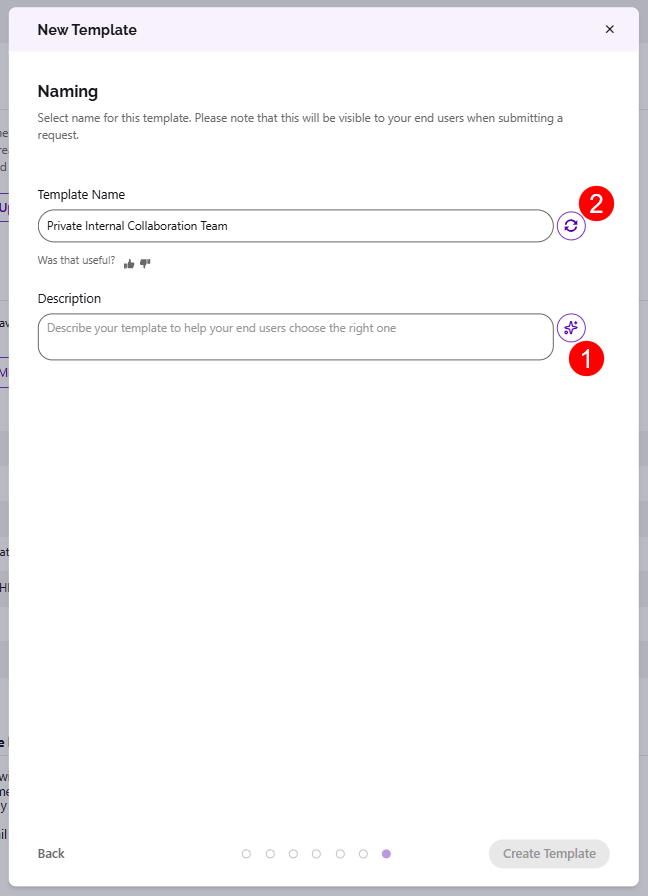
- As you configure it, on the Naming screen, you can click the AI suggestion button (1) and Point suggests a name reflecting the settings you've chosen.
- If you are unhappy with the suggestion, click the retry button (2) and another suggestion is provided.
- Accept the suggestion, edit it, or ignore it and write your own.
- The suggestion never overrides what you type.
Please note:
- Suggestions are based on the template or policy configuration — not on tenant content.
- This feature is intentionally small. It exists to speed up admin workflows, and that's it.