High Volume E-mails
High Volume E-mails allow Syskit Point to send a large number of e-mails to collaborators using Microsoft's High Volume Email (HVE) service. Enable High Volume E-mails if Syskit Point may need to send more than 10,000 e-mails in a day. Exchange Online allows up to 10,000 recipients per day per mailbox, and Syskit Point stops at 9,500 to leave room for other e-mails.
High Volume E-mails are not a separate sending method. They are used alongside the Exchange Online or SMTP method configured in the E-mail settings. When High Volume E-mails are enabled, only supported e-mails are sent through HVE, while all other e-mails are still sent using the selected Exchange Online or SMTP method.
Please note!
Only users assigned to the Syskit Point Admin role can access and configure Settings in Syskit Point.
High Volume Email is a paid Microsoft 365 service that you need to set up in your tenant first. To use High Volume E-mails in Syskit Point, the following needs to be completed:
In Microsoft 365, you'll need to:
- Set up pay-as-you-go billing and create a billing policy in the Microsoft 365 admin center; an Azure subscription is required
- Connect the billing policy to the High Volume Email service in the Microsoft 365 admin center
- Create an HVE account and assign the billing policy to it in the Exchange admin center
- Learn how to create an HVE account in this Microsoft article.
- The HVE account can send e-mails only when a valid billing policy is assigned to it
In Syskit Point, you'll need to:
- Enable High Volume E-mails, enter the HVE account, and grant permissions in the High Volume E-mails settings
Supported E-mails
When High Volume E-mails are enabled, the following e-mails are always sent through HVE:
- Workspace Review e-mails, including reviews started automatically by Workspace Review policies and reviews started manually with the Start Now or Request Workspace Review actions
- Reminder and escalation e-mails for Workspace Review tasks; learn more about reminders and escalations here
- Policy violation e-mails sent to collaborators when task delegation is enabled for a policy
- Workspace Review completed e-mails sent once Workspace Review tasks are completed
Scheduled reports and all other e-mails sent by Syskit Point are not sent through HVE and are still sent using the selected Exchange Online or SMTP method.
Please note!
- High Volume Email supports internal recipients only. E-mails to external recipients can't be sent through HVE; in that case, Syskit Point uses a fallback to make sure the e-mails are still sent.
- The maximum message size is 10 MB, and one message can have up to 50 recipients.
- The HVE account can't receive e-mails, as it doesn't have a mailbox.
- High Volume Email is billed based on the number of delivered e-mail recipients.
Learn more about High Volume Email limitations and pricing by taking a look at this Microsoft article.
High Volume E-mails Settings
To enable High Volume E-mails in Syskit Point:
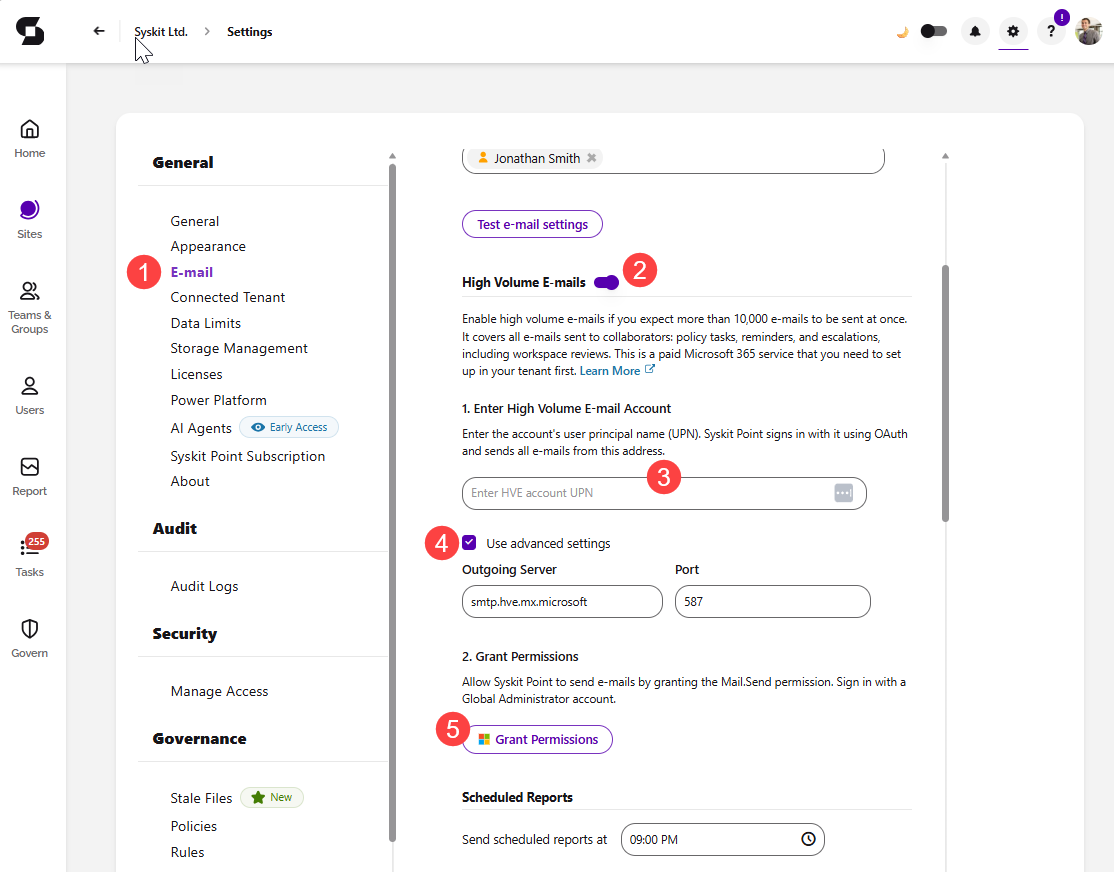
- Navigate to Settings > General > E-mail (1)
- Switch the toggle on (2) next to High Volume E-mails
- Under 1. Enter High Volume E-mail Account, enter the user principal name (UPN) of the HVE account (3); Syskit Point signs in with it using OAuth and sends supported e-mails from this address
- Check the Use advanced settings box (4) to view or change the Outgoing Server (
smtp.hve.mx.microsoft) and Port (587)
- Check the Use advanced settings box (4) to view or change the Outgoing Server (
- Under 2. Grant Permissions, click Grant Permissions (5) and sign in with a Global Administrator account to grant Syskit Point the
Mail.Sendpermission