Workspaces with Expired Sharing Links
Syskit Point detects expired sharing links in workspaces, which should be deleted to reduce clutter and increase security.
Expired sharing links don't provide access anyway; therefore, deleting them poses a low-impact action, but still contributes to the improved security posture of your tenant.
Workspaces with Expired Sharing Links Policy
The Workspaces with Expired Sharing Links is a tenant-wide policy, and it cannot have task delegation enabled. That means that no tasks are created to resolve this policy vulnerability, and no emails are sent to collaborators.
The Workspaces with Expired Sharing Links policy vulnerability is still detected and shown on the Security and Compliance dashboard. This means that Syskit Point detects the vulnerability in a workspace based on the policy, but it does not create tasks or send any emails to collaborators.
There are 2 options on how to resolve the detected vulnerability:
- Manually - admins remove expired sharing links manually.
- Automatically - Syskit Point automatically removes expired sharing links from workspaces.
Use this link to find more information on the Workspaces with Expired Sharing Links Policy.
Workspaces with Expired Sharing Links Report
Here, you can find more details about the detected vulnerability.
On the Security & Compliance dashboard, click the Workspaces with Expired Sharing Links vulnerability to open the report.
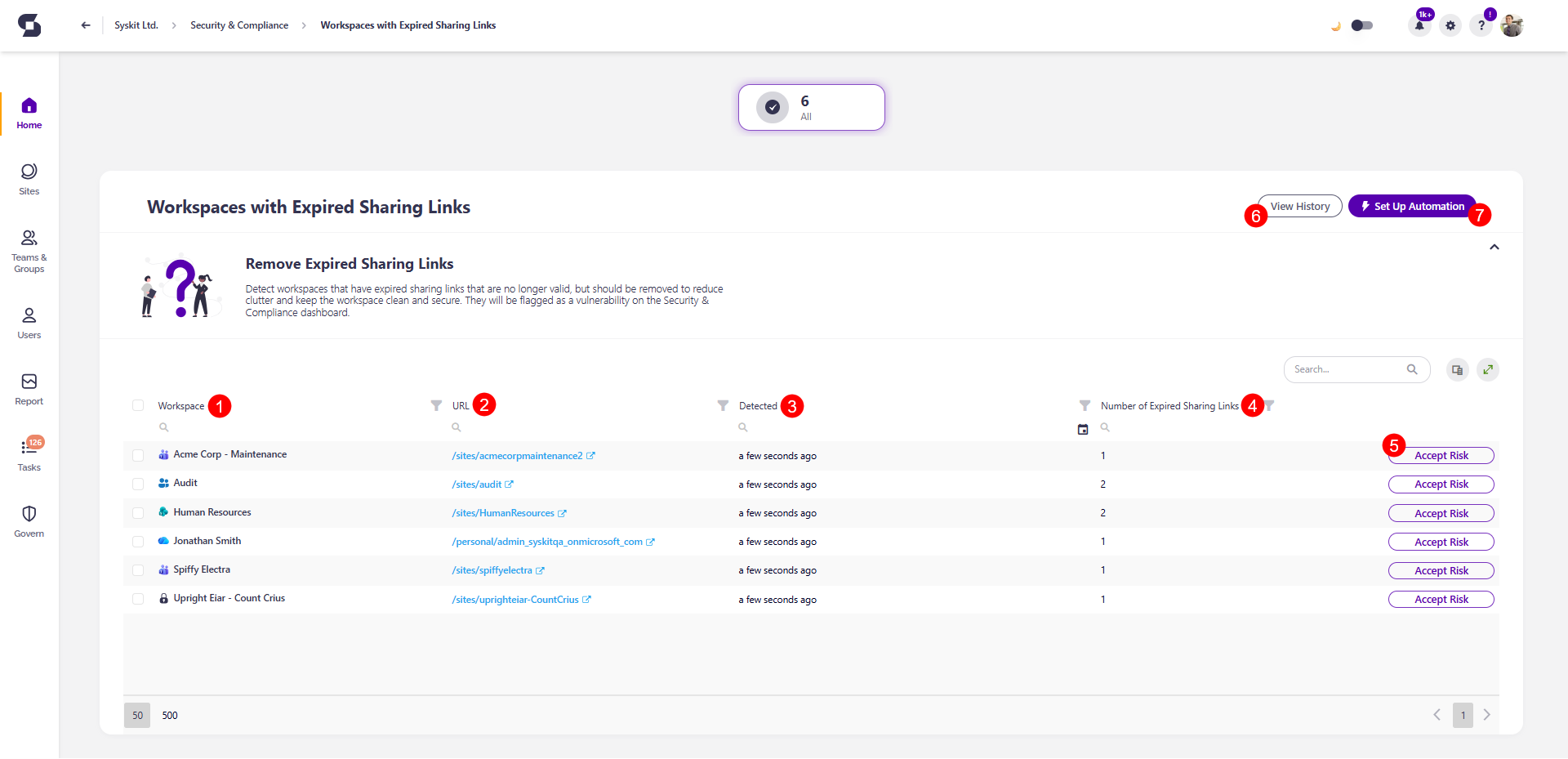
The Workspaces with Expired Sharing Links screen opens, showing a list of all workspaces with expired sharing links.
The report itself provides information on:
- Workspace (1) name
- URL (2) of the workspace with expired sharing links
- Detected (3) - shows when the vulnerability was detected.
- Number of Expired Sharing Links (4) for each workspace
Here, you can also run the Accept Risk (5) action for a selected period. The Remove Sharing Link action will be added in the upcoming release to additionally simplify manual vulnerability resolution.
You can also:
- View History (6) of all resolved vulnerabilities.
- For each workspace, you can see details about the performed expired sharing links removal actions and the policy vulnerability resolution.
- Set Up Automation (7) for the Workspaces with Expired Sharing Links policy.
- Click the button to open the Workspaces with Expired Sharing Links policy settings and select from one of the available automation options.
- Syskit Point can automatically remove expired sharing links and resolve the vulnerability, which is the recommended option here.
Please note!
It can take up to 24 hours for the vulnerabilities to appear on the Security & Compliance dashboard and for the expired sharing links to be deleted if the automatic resolving option is selected.