Workspace Review Privacy and Sensitivity
If Sensitivity and Privacy reviews were set up as a part of the Workspace Review, they will be a part of the Overview step.
-
For more details on what a privacy review entails outside of a Workspace Review, take a look at the Complete Privacy Review article.
-
For more details on what the sensitivity review looks like outside of a Workspace Review, take a look at the Complete Sensitivity Review article.
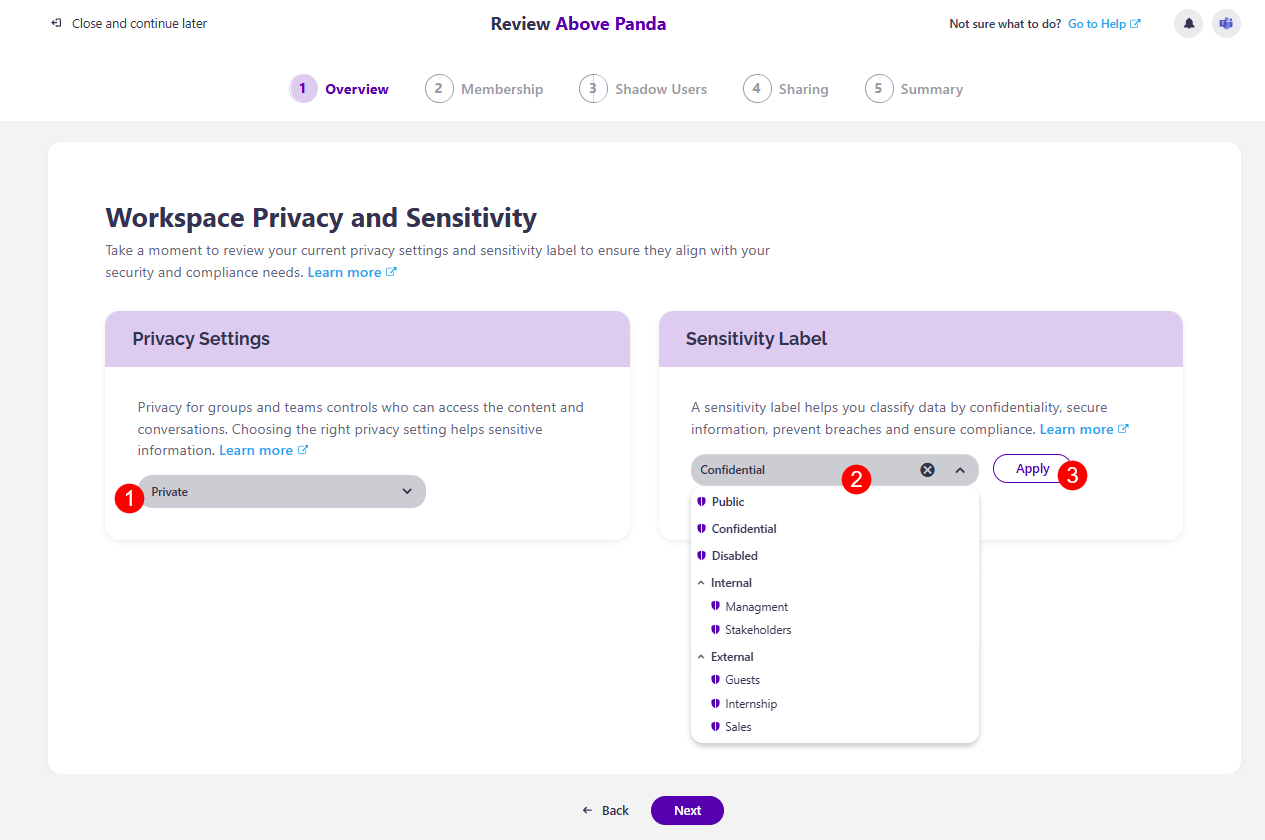
Clicking Next after the Overview step opens the Workspace Privacy and Sensitivity screen.
Privacy (1) for groups and teams controls who can access the content and conversations, and choosing the right privacy settings helps protect sensitive information.
- From the drop down bar, you can select between two options:
- Private - private groups or teams are only accessible to approved members, keeping files, chats, and information visible only to these members.
- Public - public groups or teams are open to everyone in your organization - they can find and join them without approval.
A Sensitivity Label (2) helps you classify data by confidentiality, lets you secure information, prevent breaches, and ensure compliance.
- From the drop-down bar, you can select between the sensitivity label options available for your company.
- Click the Apply button (3) next to the drop-down bar to apply your chosen sensitivity label
Once you've made your changes, click Next to proceed to the next step, Membership.